After soldering, a circuit board may look clean while a thin amber film remains beneath components, around pads, or inside connector edges. This residue can attract moisture, reduce insulation resistance, and complicate later inspection. Learning how to clean flux residue after soldering joints is therefore a reliability task, not merely a cosmetic step.
Bob Willis, a respected electronics assembly consultant and trainer, often reminds engineers, “Cleanliness is a process, not a one-time operation.” That principle matters because flux chemistry, board finish, component spacing, and soldering temperature all influence the correct cleaning method. A no-clean flux may require different handling from a water-soluble or rosin-based flux. There is no universal shortcut.
This guide presents seven practical tips for removing residue safely and consistently. It covers choosing compatible solvents, controlling brush pressure, protecting sensitive parts, and drying hidden areas thoroughly. Small details matter. A soft brush can loosen contamination without scratching the solder mask. Excess liquid can travel beneath a package and remain trapped.
Inspection should follow every cleaning attempt. Use bright angled light, magnification, and, when appropriate, ionic contamination testing. Some residue is difficult to see. That is the uncomfortable part. A board may pass a visual check and still need further evaluation. Always test the selected cleaner on a sample board first, and follow the component and solvent manufacturer’s instructions. Better results come from measured cleaning, careful documentation, and a willingness to question assumptions.
Identify the Flux Residue and Check the Soldered Joint
Identify the residue before cleaning. Clear, amber, or brown films may come from rosin or no-clean flux. White crystals often indicate activated residue or trapped cleaner. Do not judge by shine alone. IPC-A-610 guidance treats solder shape, wetting, bridges, and contamination as separate inspection points. Under magnification, check the joint’s heel, toe, and pad edges. A smooth fillet should show good wetting, not a dull crack or lifted component.
Tip 1:
Photograph the joint before cleaning. Record the flux color, location, and solder appearance. This small step prevents guesswork later. IPC-TM-650 cleanliness methods commonly report ionic contamination in micrograms of sodium-chloride equivalent per square centimeter. A legacy industry benchmark is 1.55 μg/cm², converted from 10 μg/in². It is only a reference, not a universal pass limit. Always follow the assembly specification.
Tip 2:
Test the joint before wiping hard. Use a microscope, continuity check, and gentle mechanical inspection. If residue hides a void, bridge, or cold joint, cleaning can create false confidence. Apply a compatible solvent with a lint-free swab, then inspect the area again. I have seen technicians remove visible flux and miss a dull solder fillet underneath. That is an easy mistake. If residue remains under a lead or connector, use controlled cleaning and verify ionic cleanliness when reliability matters.
Gather Suitable Cleaning Tools and Protective Equipment
Cleaning flux residue begins with the right tools, not stronger chemicals. Prepare an ESD-safe brush, lint-free wipes, a suitable electronics cleaning solvent, and a small container for used materials. Wear safety glasses, chemical-resistant gloves, and protective clothing. Good ventilation matters, even when the residue looks harmless. Check the solvent’s safety information before opening it.
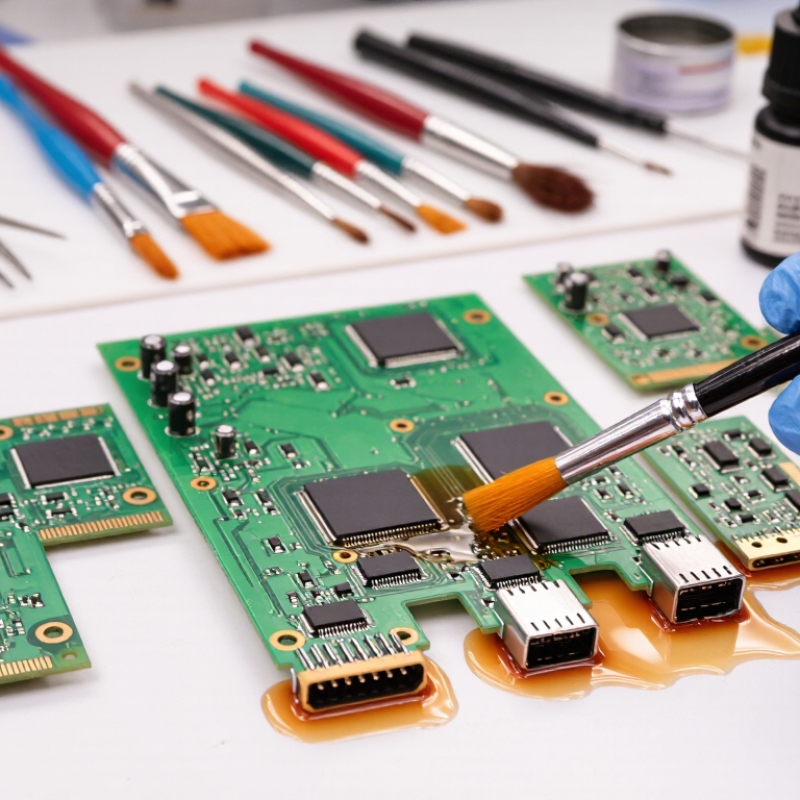
Work on a stable, clean surface with the circuit powered off and disconnected. Apply a small amount of solvent to the brush or wipe, rather than flooding the board. Gently loosen residue around solder joints, then remove the softened material with a fresh wipe. Keep liquids away from connectors, switches, and unsealed components. Never use metal tools that could scratch pads or bridge contacts.
Inspect the joint under bright light. A clean surface should not feel sticky or show cloudy deposits. Test the cleaning method on an unimportant area first. I once used too much solvent near a connector and needed extra drying time. That mistake reminded me to control the quantity, not just the chemical choice. Allow the board to dry completely before inspection or testing. Dispose of contaminated wipes and solvent according to local safety requirements. Keep the work area organized. Small oversights can become expensive faults.
7 Tips to Clean Flux Residue After Soldering Joints
Gather suitable cleaning tools and protective equipment before removing residue. The chart shows practical starting targets for cleaning and drying different flux-residue conditions. Always confirm solvent compatibility and process limits in the flux and PCB documentation.
Recommended setup: use lint-free swabs or a soft ESD-safe brush, suitable flux remover or deionized water, absorbent wipes, safety glasses, chemical-resistant gloves, and adequate ventilation. Inspect the joint under magnification after cleaning.
Remove Loose Residue Before Applying Any Cleaner
7 Tips to Clean Flux Residue After Soldering Joints
Remove Loose Residue Before Applying Any Cleaner
Loose flux residue is the first contamination to remove. Do not wet it immediately. I once applied cleaner to a dusty joint, and the paste spread beneath nearby components. That mistake made inspection harder. Let the assembly cool, then use a clean, soft brush or low-pressure, oil-free air. Keep it dry.
IPC-CH-65B emphasizes matching cleaning methods with flux chemistry, component spacing, and board materials. Dry removal reduces the amount of dissolved residue that later becomes a stubborn film. Brush gently around leadless packages, connectors, and test points. Avoid dragging particles across exposed pads. A magnifier helps reveal amber flakes hiding beside solder fillets.
After loose material is removed, select a compatible cleaner and follow its technical data sheet. Control the contact time, temperature, and rinse quality. According to IPC-TM-650 guidance, the commonly referenced 1.56 μg NaCl-equivalent/cm² limit for ionic cleanliness testing is only a process indicator. It does not prove every residue is harmless. That distinction matters. A board may look bright while trapped contamination remains under a component. I still find visual inspection reassuring, but it is not enough. Verify critical assemblies with documented testing, then allow complete drying before electrical evaluation.
Clean the Joint Using a Compatible Flux Remover
After soldering, flux residue can hide beneath components, around leads, and inside tight connector gaps. The safest approach is using a flux remover compatible with the specific residue. No-clean, water-soluble, and rosin-based fluxes do not respond identically. Check the flux technical data sheet and the remover’s safety data sheet before touching the joint.
My early mistake was assuming isopropyl alcohol could clean every board. It could not. Some residues smeared into a thin, sticky film. Apply a small amount of compatible remover to a lint-free swab, then work from the cleaner edge toward the joint. Use a soft brush for corners, but avoid excessive pressure on small components. Follow the required dwell time. Then remove dissolved residue with a fresh swab or controlled rinse, and dry the board completely.
Inspect the area under magnification. Look for white crystals, oily shadows, or a dull film. These details matter. IPC-TM-650 Method 2.3.25 measures ionic contamination using resistivity of solvent extract testing. A commonly used screening level is 1.56 µg/cm² sodium-chloride equivalent, although acceptance limits depend on the assembly and process. Visual inspection alone cannot confirm ionic cleanliness. A report from the Association Connecting Electronics Industries also emphasizes process control and verification rather than relying on appearance alone. Test a small area first. Some removers may affect conformal coatings, plastics, markings, or exposed finishes. I still find this step easy to skip, especially during rework, but that shortcut can create a larger reliability problem later.
Inspect, Dry, and Protect the Cleaned Soldering Area
After soldering, inspect the joint under bright, angled light. Look for white haze, sticky amber film, trapped residue, or dull solder edges. Use magnification around pads, vias, and component leads. These small gaps often retain flux. Remove loose residue with a lint-free swab and a compatible electronics cleaner. Never flood connectors or switches without checking their material limits. A clean appearance can mislead.
Dry the board completely before testing. Use filtered, low-pressure air to push moisture away from sockets and under packages. Then allow a controlled air-drying period. Do not rely only on heat; uneven heating can stress components or spread contamination. IPC-TM-650 2.3.25 uses 10.06 micrograms of sodium-chloride equivalent per square inch as a common ROSE screening limit. Treat it as a screening value, not proof of reliability. Localized residue may escape the test. I still recheck critical areas with a fresh swab. It feels repetitive, but it catches what visual inspection misses. After drying, inspect under magnification again, measure insulation resistance when required, and record the cleaning method, solvent, drying time, and operator. Protect the finished area with suitable coating only after confirming complete cleanliness and dryness. IPC J-STD-001 and IPC-A-610 workmanship guidance support controlled inspection and process documentation. A rushed final check remains the weak point.
FAQS
Prepare an ESD-safe brush, lint-free wipes, and a compatible electronics cleaner. Wear safety glasses, chemical-resistant gloves, and protective clothing. Ventilation still matters. Use a small container for contaminated materials.
Power off and disconnect the board completely. Place it on a stable, clean surface. Test the cleaner on an unimportant area first. This small step can prevent expensive damage.
No. Apply a small amount to the brush or wipe. Work gently around solder joints. Keep liquid away from connectors, switches, and unsealed components. Too much solvent can require extra drying time.
Choose a remover compatible with the specific flux type. No-clean, water-soluble, and rosin-based residues behave differently. Check the flux and cleaner safety information. Common assumptions can fail.
Use a soft brush around leads, pads, vias, and connector gaps. Work from the cleaner edge toward the joint. Use fresh swabs to collect dissolved residue. Avoid pressure on small components.
Look for white crystals, cloudy deposits, sticky amber film, oily shadows, or dull solder edges. Inspect under bright, angled light and magnification. A clean appearance can mislead. Some contamination remains hidden.
Use filtered, low-pressure air to move moisture away from sockets and packages. Then allow controlled air drying. Do not depend only on heat. Uneven heating may stress components or spread contamination.
Reinspect critical areas with a fresh lint-free swab. Measure insulation resistance when required. Ionic contamination testing can provide useful screening information. A common screening value is about 1.56 micrograms per square centimeter. It is not proof of long-term reliability.
Record the cleaner, cleaning method, drying time, inspection result, and operator. Confirm the board is completely dry before testing. Apply protective coating only after cleanliness is verified. I still find rushed final checks easy to make.
Conclusion
Learning how to clean flux residue after soldering joints begins with identifying the residue and checking the joint for defects, weak connections, or signs of overheating. Before cleaning, prepare suitable tools such as lint-free swabs, a soft brush, clean wipes, and an appropriate flux remover, while using protective equipment like gloves and eye protection. Work in a well-ventilated area and confirm that the cleaning solution is compatible with the circuit board, components, and other nearby materials.
First, gently remove loose residue with a dry brush or wipe to prevent spreading it across the board. Apply the compatible cleaner in a controlled amount, focusing on the soldered area, then loosen remaining residue with a soft brush or swab. After cleaning, inspect the joint under good lighting to ensure it is free of contamination and still mechanically sound. Allow the area to dry completely before powering the assembly, and consider applying suitable protection if the circuit will face moisture, dust, or other environmental exposure.
 Karam Tools
